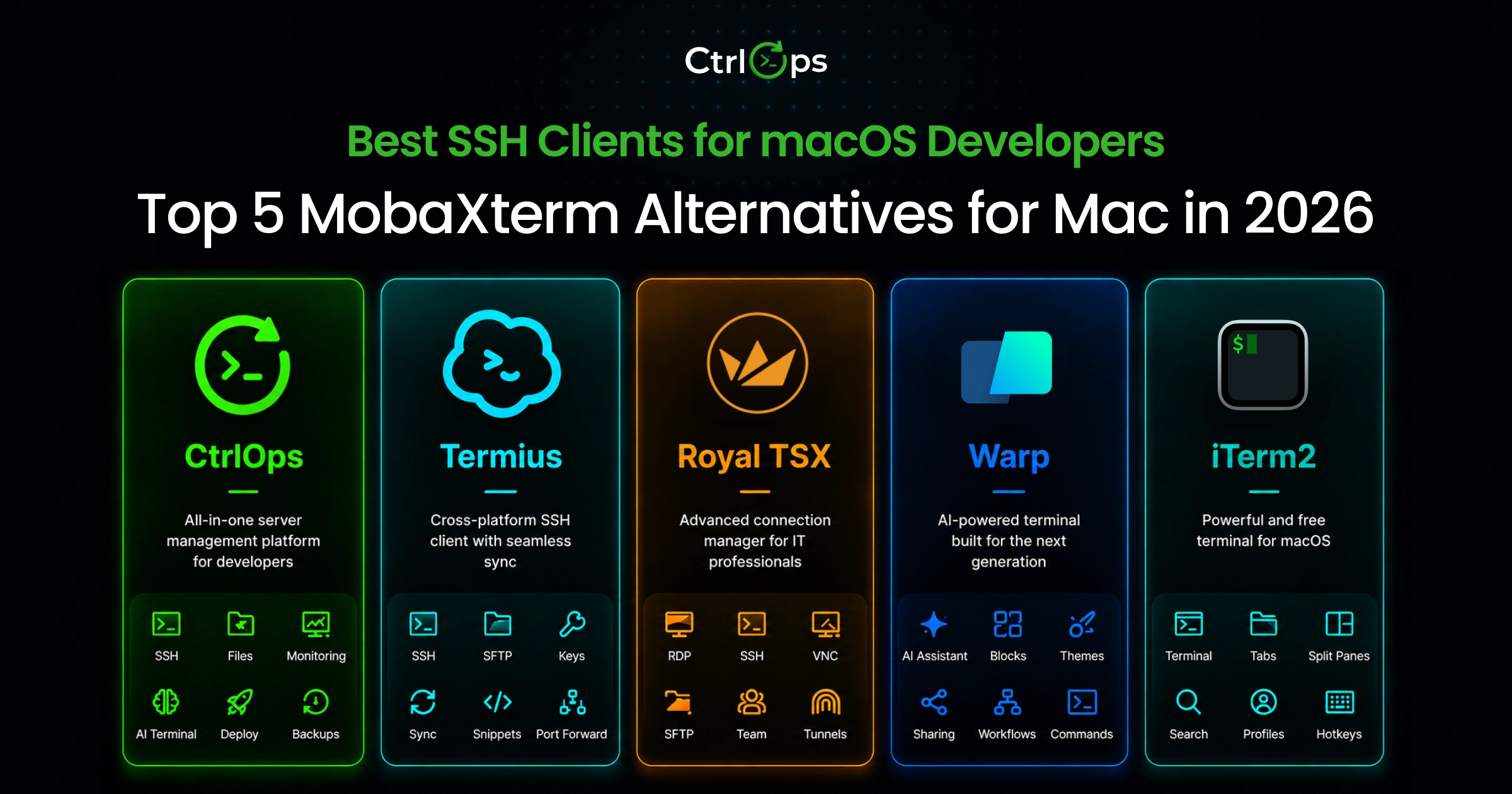

MobaXterm is Windows-only and has never had a macOS version. The 5 best MobaXterm alternatives for Mac in 2026 are CtrlOps (all-in-one server management), Termius (cross-device SSH sync), Royal TSX (multi-protocol RDP/SSH/VNC), Warp (AI-first coding terminal), and iTerm2 (free open-source terminal).
Here's how each handles real server tasks on Mac:
| Tool | Best For | Price | AI | File Manager | Local Credentials |
|---|---|---|---|---|---|
| CtrlOps | All-in-one server management | $7/user/mo (1 mo free) | ✓ Approval-gated | ✓ Full GUI | ✓ Local-only |
| Termius | Cross-device SSH sync | Free / $10/user/mo | ⚠️ Autocomplete (Gloria in preview) | ✓ SFTP | ⚠️ Cloud on paid tiers |
| Royal TSX | Multi-protocol IT work | Free / €49 one-time | ✗ | ✓ SFTP | ✓ Local |
| Warp | AI-first coding terminal | Free / $20/mo | ✓ Auto-run | ✗ | ✗ Cloud required |
| iTerm2 | Free terminal emulator | Free | ✗ | ✗ | ✓ Local |
Prefer to watch instead? The full rundown - why MobaXterm never shipped on Mac, and how all five alternatives handle real server work - in a few minutes:
The 5 Best MobaXterm Alternatives for Mac (2026)
The best MobaXterm alternative for Mac depends on why you used MobaXterm. For full server management with AI assistance, CtrlOps is the closest match. For cross-device SSH sync, Termius leads. For multi-protocol IT work including RDP, Royal TSX is purpose-built. For a fast modern terminal, Warp. For zero-cost local terminal work, iTerm2.
Alternative 1: CtrlOps - Best for Developers Who Want More Than SSH
CtrlOps is a desktop app for macOS, Windows, and Linux that replaces your SSH client, file transfer tool, monitoring dashboard, and deployment system in one local-first interface.
If you managed multiple servers on MobaXterm and want the best SSH client for Mac, CtrlOps is the closest match. It does things MobaXterm never did.
What it does well:
- Named server cards: Connect to "Prod-Backend" or "Client-XYZ-Staging" in one click. No IPs to memorize.
- Full GUI file manager: Upload, download, edit remote files with drag-and-drop. No
scpcommands, no separate SFTP tool. - Approval-gated AI terminal: Ask "why is my server slow?" and get diagnostic commands shown before execution. Supports web search for live docs and MCP servers for repo-aware context.
- Modern terminal UX: Several terminals per server, each tab named after the command you ran. Block view keeps every command with its own output for copying, filtering, or re-running, and suggestions are configurable down to what Tab does.
- 1-click deployment: Pick your framework, paste GitHub repo, add env variables. CtrlOps handles git clone, dependencies, PM2, Nginx, and SSL.
- Infrastructure monitoring: Live CPU, RAM, disk for every server. No
htopin a separate window. - Cron Jobs: Schedule jobs without cron syntax and get a Slack or Telegram alert when one fails, or when CPU or disk crosses a limit.
- Log management: Auto-discovers every log file on your server, grouped by source. Search, live tail, and download without terminal commands.
- Script Directory: Save reusable scripts with
{{variable}}placeholders. Reuse them on any server you open. - Port forwarding: Save local, remote, or SOCKS tunnels as named forwards and start one in a click. No tunnel cap, where MobaXterm Home stops at 2.
- Access management: See who can SSH into every server across your fleet. Onboard or offboard across all servers in one action.
- Security audit: Run 25 agentless security audits across your servers, databases, web servers, and Docker. Get a hardening score, a PDF report, and AI-written fixes you approve before they run.
To see all features, visit the CtrlOps features page.
Where CtrlOps falls short:
- No mobile app, Termius wins for phone-based SSH
- No serverless or Kubernetes support
Pricing: $7/user/month or $70/user/year (unlimited servers). 1 month free trial, no credit card required.
Platforms: macOS (Apple Silicon + Intel), Windows, Linux.
If you want to manage multiple servers without losing track of which tab is which client, CtrlOps is purpose-built for that.
Here's what "everything in one window" actually looks like - adding a server and working with it, start to finish:
Alternative 2: Termius - Best Cross-Device SSH Client
Termius is a modern SSH client that syncs your servers, keys, and configurations across Mac, Windows, Linux, iOS, and Android.
If the main thing you want from a MobaXterm alternative is clean SSH management with cross-device access, Termius is the most polished option in 2026. It runs natively on Mac, including Apple Silicon. The interface feels like a product designed for developers, not a ported Windows tool.
What it does well:
- Cross-device sync - your hosts, keys, and settings work on Mac, iPad, and iPhone without re-entering anything
- Built-in SFTP for file transfers without switching apps
- SSH key management that doesn't involve editing
~/.ssh/config - Snippets for saving and reusing commands
- AI autocomplete that suggests commands as you type
- Gloria, an agentic DevOps assistant, is in limited preview - it can take on infrastructure tasks like installing and configuring services, though it's not yet generally available
- Port forwarding with a visual interface
Where Termius falls short:
- No one-click deployment
- No infrastructure monitoring dashboard
- SSH keys sync to Termius cloud servers, a hard blocker if client contracts restrict third-party credential storage
Pricing:
- Starter: Free - SSH/SFTP, AI autocomplete, port forwarding, local vault (credentials stay on your machine, no cloud sync on this tier)
- Pro: $10/month (billed annually) - personal cloud vault, cross-device sync, snippets, log bookmarks
- Team: $20/user/month (billed annually) - shared team vault, real-time collaboration, consolidated billing
- Business: $30/user/month (billed annually) - multiple vaults, granular access control, SAML SSO add-on
That's $120/year per person on Pro versus $70/year for CtrlOps with significantly more features. For a 5-person team, Termius Team costs $1,200/year. See the full cost and feature breakdown in CtrlOps vs Termius.
Reality check: On the free Starter plan, credentials stay in a local vault. Upgrade to Pro or above, and SSH credentials move to Termius's cloud. Check client agreements before upgrading. If that trade-off rules Termius out, see Termius alternatives across all platforms, or the Mac-specific breakdown.
Alternative 3: Royal TSX - Best for IT Pros Managing Multiple Protocols
Royal TSX is a Mac-native connection manager that handles SSH, RDP, VNC, SFTP, and web connections from a single interface - the closest thing to MobaXterm's multi-protocol approach on macOS.
If your job involves jumping between SSH sessions, Windows Remote Desktop connections, and VNC consoles all day, Royal TSX is built exactly for that. It's the connection hub IT professionals reach for on Mac.
What it does well:
- Multi-protocol in one app: SSH, RDP, VNC, SFTP, Telnet, web connections
- Tree-based folder structure for organizing connections cleanly
- Credential management - assigns credentials to connections without exposing them
- Perpetual license model: buy once, own it. No monthly subscription
- Free tier available (up to 10 connections, enough to test)
- No cloud dependency - connections and credentials stay on your machine
Pricing:
- Free: Up to 10 connections (personal use)
- Individual User License (Royal TSX for Mac): €49 one-time (includes 1 year of software maintenance)
- Royal TS/X + Royal Server Personal Bundle: €99 one-time
Licenses are perpetual. You pay once and get 1 year of free updates. After that, you can pay ~50% of the license price to extend maintenance - or just keep using the version you bought.
Where Royal TSX falls short:
- No AI features of any kind
- No infrastructure monitoring dashboard
- No one-click app deployment
- UI feels heavy for developers used to modern interfaces
- No built-in script automation
Bottom line: Royal TSX fits IT pros living in RDP and VNC across a mixed fleet. For developers managing web servers and cloud VPS, it has no AI terminal, no infra dashboard, and no deployment automation. If you're coming from SecureCRT instead, see SecureCRT alternatives for Mac.
Alternative 4: Warp - Best Modern AI Terminal for Local Development
Warp is a Rust-built terminal emulator for Mac (and Windows/Linux) with a block-based interface, IDE-like editing, and a powerful AI Agent Mode that converts natural language to shell commands.
If what you're really replacing is just MobaXterm's terminal - and you do most of your work locally or on a single server - Warp is one of the most polished terminal experiences available on Mac in 2026. For a direct head-to-head of all three classic tools, see the PuTTY vs MobaXterm vs Warp comparison.
What it does well:
- Built in Rust - fast, no Electron lag
- Block-based output: each command and its result stays in a distinct block, making it easy to scan, copy, and share
- AI Agent Mode: type a task in natural language, Warp generates the commands (note: Warp's Agent Mode can auto-execute, unlike CtrlOps)
- Warp Drive: shared team command library
- Multi-agent support: run multiple AI agents in parallel tabs
Pricing (as of 2026):
- Free: Core terminal features + 75 AI credits/month (150/month for the first two months)
- Build: $20/month - 1,500 AI credits/month, BYOK support, rollover Reload Credits
- Business: $50/user/month - everything in Build, plus SSO, Zero Data Retention, and shared team credits
Warp restructured pricing in late 2025. Build tier is $20/month, Business is $50/user/month. The terminal remains free without AI credits.
Where Warp falls short:
- No multi-server dashboard, Warp is a terminal, not a server management tool
- No GUI file manager
- No infrastructure monitoring
- No one-click deployment
- Requires a Warp cloud account
- AI Agent Mode can auto-run commands, meaningful risk on production servers
Reality check: Warp's Agent Mode can execute commands automatically on your server without showing you first. On a staging machine, that's fine. On production, it's a different conversation - one unreviewed command can take down a live service. CtrlOps always shows generated commands before anything runs.
Alternative 5: iTerm2 - Best Free Terminal Emulator for Mac
iTerm2 is the most widely used free, open-source terminal emulator for macOS - a powerful upgrade from Apple's default Terminal.app that's been battle-tested by millions of developers since 2010, with over 16,000 stars on GitHub.
If you're on a tight budget or you just need a solid terminal without extra tooling, iTerm2 is the honest answer.
What it does well:
- Split panes - divide your terminal window horizontally and vertically for multiple sessions at once
- Hotkey window - summons the terminal from any app instantly
- Tmux integration - manages tmux sessions through a native Mac interface
- Advanced search with regex support across the full scrollback buffer
- Password manager integration (1Password, Bitwarden, Keeper Security)
- Fully local - no cloud account, no subscription, no tracking
- Donationware - free, with an optional donation to support development
Pricing: Free (open source, GPL-2.0)
Where iTerm2 falls short:
- No AI features
- No graphical file manager, you're back to SCP commands for file transfers
- No server dashboard or multi-server management
- No deployment tooling
- macOS only, if your team uses Windows or Linux, they need something else
Bottom line: iTerm2 is the right tool if you want a free, reliable terminal and you're happy managing file transfers and monitoring through separate tools. If tool-switching is killing your productivity, see how AI is changing DevOps workflows with approval-gated commands.
Quick Comparison Table
| Factor | CtrlOps | Termius | Royal TSX | Warp | iTerm2 |
|---|---|---|---|---|---|
| Price | $7/mo/user · $70/yr/user (1 mo free) | Free / $10/mo / $20/mo | Free / €49 one-time | Free / $20/mo | Free |
| macOS Support | ✓ | ✓ | ✓ | ✓ | ✓ |
| Windows/Linux | ✓ | ✓ | ✗ Mac-only | ✓ | ✗ |
| Mobile App | ✗ | ✓ iOS + Android | ✓ iOS + Android | ✗ | ✗ |
| Multi-Server Dashboard | ✓ Named cards | ⚠️ Host list | ✓ Folder tree | ✗ | ✗ |
| GUI File Manager | ✓ Full GUI | ✓ SFTP | ✓ SFTP | ✗ | ✗ |
| AI Terminal | ✓ Approval-gated | ⚠️ Autocomplete (Gloria in preview) | ✗ | ✓ Auto-run | ✗ |
| Infra Monitoring | ✓ Dashboard | ✗ | ✗ | ✗ | ✗ |
| Log Management | ✓ Auto-discovery | ✗ | ✗ | ✗ | ✗ |
| 1-Click Deployment | ✓ | ✗ | ✗ | ✗ | ✗ |
| Local Credentials | ✓ Local-only | ⚠️ Local on free, cloud on Pro+ | ✓ Local | ✗ Cloud required | ✓ Local |
| Free Trial | 1 month free | Free plan | Up to 10 connections | Free terminal | Always free |
Why You Need a MobaXterm Alternative on Mac
It's midnight. You've just switched from a Windows machine to a MacBook, or your team lead hands you a new M3 Pro and says, "Get our 12 servers sorted by tomorrow." You Google "MobaXterm for Mac" and immediately hit a wall: MobaXterm is Windows-only. It always has been.
That's the moment freelance developers, startup CTOs, and agency engineers realize they need to find a MobaXterm alternative for Mac fast. And it's a common moment: 31.8% of professional developers work on macOS according to the 2024 Stack Overflow Developer Survey, making it the second most popular developer OS - and a steady stream of them arrive from Windows setups built around MobaXterm. And not just any alternative. You want something that handles SSH, maybe file transfers, and ideally doesn't require three extra apps just to do what MobaXterm did on Windows.
We compared five tools against the same real-world tasks - connecting to multiple servers, transferring files, running diagnostic commands, and deploying an app - so you don't have to.
Why Mac Users Keep Getting Sent to MobaXterm?
MobaXterm was built for Windows system administrators and has never had a macOS release in the company's history - Mobatek has been building Windows system and network software since 2008, and has not announced plans to change that. Mac users searching for MobaXterm are usually after one of three things: multi-tab SSH sessions, a graphical file browser, or a single app that handles multiple servers. All three are fully covered by the Mac alternatives in this list.
What made MobaXterm worth defending on Windows was the bundle: SSH, X11 forwarding, RDP, VNC, SFTP, and a built-in Unix environment, all in one app. That's genuinely useful - if you live on Windows. The catch is that the X11-server architecture it's built around is Windows-native, which is a big part of why there's never been a Mac port. So every time a developer switches to Mac, or a cross-platform team onboards a new engineer with a MacBook, someone has to explain the "MobaXterm doesn't work on Mac" situation again.
The good news: macOS has better native SSH infrastructure than Windows ever did - OpenSSH ships built into macOS, and Apple's own Remote Login feature runs on it. The tools that fill the gap on Mac are actually more capable for developers in 2026 - especially if you want features like AI-assisted terminal commands, GUI file managers, or multi-server dashboards.
What you're really looking for depends on why you used MobaXterm:
- You loved the multi-tab SSH sessions - Termius, Royal TSX, or CtrlOps
- You relied on the graphical file browser - CtrlOps or Transmit
- You just want a solid terminal - iTerm2 or Warp
- You managed 5+ servers and needed a dashboard - CtrlOps
Bottom line: MobaXterm's core value was "everything SSH-related in one place." On Mac in 2026, CtrlOps comes closest to that - and goes further with an AI terminal and one-click app deployment.
Which One Should You Pick?
There's no single "best" MobaXterm alternative for Mac - it depends on what you actually used MobaXterm for.
Here's the honest breakdown:
Choose CtrlOps if you're a developer or startup CTO managing 3+ servers. You want SSH, file transfers, monitoring, log viewing, and AI diagnostics in one app instead of four. $7/user/month or $70/user/year. Try CtrlOps free for 1 month, no credit card needed.
Choose Termius if you work across Mac, iPad, and iPhone and want your server list synced across devices. Great for solo developers who need clean SSH management with SFTP. SSH credentials go to Termius's cloud on paid tiers, so review your client agreements first.
Choose Royal TSX if you're an IT professional managing Windows RDP connections alongside SSH and VNC. Royal TSX is the only tool here that handles all three protocols well on Mac. A one-time purchase also makes sense if you dislike subscriptions.
Choose Warp if you want the most modern, AI-enhanced terminal experience for local development and single-server work. It's a strong MobaXterm alternative if what you mainly used was the terminal - not the multi-server management.
Choose iTerm2 if you need zero-cost, zero-cloud, maximum reliability. It's the right foundation if you're comfortable in the terminal and manage everything else through separate tools.
For a deeper look at how the top SSH clients for Mac stack up on key features, the best SSH clients for Mac breakdown covers the full picture. And if you're curious how AI is changing the way developers manage servers day-to-day, the AI in DevOps breakdown is worth reading next.
Bottom line: MobaXterm alternatives on Mac have caught up - and in several areas, surpassed what MobaXterm offered on Windows. CtrlOps is the only tool here that combines SSH management, file transfer, an AI-assisted terminal, and deployment in a single local-first desktop app.
How to Migrate From MobaXterm to Your Mac in 10 Minutes
You've picked a tool. Now you need your MobaXterm sessions on your Mac without redoing everything by hand. Here's the full migration in three steps.
Step 1: Export your MobaXterm sessions and keys (3 minutes)
On your Windows machine, open MobaXterm's session manager and export your saved sessions - or, if you only have a handful, just note the host, port, and username for each. MobaXterm often stores private keys in PuTTY's .ppk format, but macOS SSH tools expect standard OpenSSH keys. Convert any .ppk file with PuTTYgen (brew install putty, then puttygen yourkey.ppk -O private-openssh -o yourkey), copy your keys into ~/.ssh/ on the Mac, and lock down permissions with chmod 600 ~/.ssh/yourkey.
Step 2: Recreate your servers in your chosen tool (5 minutes)
- CtrlOps: Click New Connection, give each server a readable name ("Client-A-Prod"), paste the IP and username, and point it at your
~/.ssh/key. Moving a whole team? Import a server list instead of adding them one by one. - Termius: Add each host, attach the key from your vault, and - on a paid tier - sync across your devices.
- Royal TSX: Create a document, add connections under a folder tree, and assign saved credentials.
- iTerm2 / Warp: Add host entries to
~/.ssh/config(Host prod/HostName 1.2.3.4/User deploy/IdentityFile ~/.ssh/yourkey), then connect withssh prod.
Step 3: Connect and verify (1 minute)
Connect to one server and confirm the essentials: your key authenticates, you can open a file-transfer/SFTP view, and commands run. If a converted .ppk key fails, re-check that permissions are chmod 600 and that you pointed the tool at the OpenSSH version of the key - not the original .ppk.
Bottom line: Migrating off MobaXterm isn't a project - it's a 10-minute copy of your servers and keys into a tool that actually runs on your Mac. Nothing changes on the server side: same SSH, same keys, same access. Only the client changes.
Conclusion
MobaXterm not running on Mac is frustrating, especially if you've built your workflow around it. But the Mac ecosystem in 2026 has caught up and surpassed what MobaXterm offered on Windows.
CtrlOps is the most direct replacement if you need SSH, file transfers, monitoring, and AI diagnostics in one app. Termius wins for cross-device sync. Royal TSX handles mixed-protocol IT work. iTerm2 or Warp cover pure terminal needs.
If you're also evaluating server panels alongside SSH clients, the aaPanel alternatives guide covers the panel side. For Windows-specific tools, see PuTTY alternatives for Windows.
Pick the tool that matches your actual workflow. Not the one with the most feature checkboxes.
FAQs
No. MobaXterm is Windows-only software developed by Mobatek, a France-based company. There is no official macOS version and no indication one is planned. Mac users need a separate SSH and server management tool entirely. CtrlOps, Termius, Royal TSX, Warp, and iTerm2 are the strongest alternatives in 2026.
iTerm2 is the best free alternative if you primarily want a powerful terminal emulator - open source, actively maintained, runs on both Intel and Apple Silicon Macs. If you need a free option that also includes SFTP and multi-device sync, Termius has a free plan, though SSH credentials sync to the cloud on paid tiers and the free plan is limited to one device.
CtrlOps is a desktop app for macOS, Windows, and Linux that combines SSH, a GUI file manager, an approval-gated AI terminal, infrastructure monitoring, log management, fleet-wide access control, and one-click deployment in one interface. It organizes servers as named cards, shows real-time infra dashboards, and requires your approval before any AI-generated command runs. $7/user/month or $70/user/year with a 1 month free trial.
Termius encrypts SSH credentials but stores them in its cloud on Pro and Team plans. If your contracts restrict third-party credential storage, this is a hard blocker. CtrlOps and Royal TSX keep all credentials stored locally on your device.
Yes. Warp's Agent Mode can execute commands automatically without requiring approval first. This is efficient for local development but carries real risk on production servers where one unreviewed command can cause downtime.
Not the way dedicated server management tools handle it. Warp is a terminal emulator - you SSH into servers manually and manage them through the command line. There's no visual dashboard, named server directory, or one-click connect for a fleet of servers. For multi-server management, CtrlOps, Termius, or Royal TSX are better suited to that workflow.
CtrlOps is purpose-built for this scenario. You create named server cards per client environment ("Client-A-Prod", "Client-B-Staging"), connect instantly without memorizing credentials, manage files through the GUI without switching to Cyberduck or FileZilla, and diagnose issues through the AI terminal - all without storing credentials in third-party cloud services. Server list import/export means onboarding a new team member takes minutes, not an afternoon.
Yes. CtrlOps runs natively on macOS with both Apple Silicon (M1/M2/M3/M4) and Intel chips. It also runs on Windows and Linux, so teams using mixed hardware can all work from the same tool without platform-specific workarounds or compatibility issues.
MobaXterm has been Windows-only since 2008 and Mobatek has not announced any plans for a macOS version. The app relies on a Windows-native X server architecture that would require a near-complete rewrite to port to macOS. Mac users should not wait for an official release - the alternatives covered here are mature and, in several areas, more capable.
Yes. CtrlOps and Termius both run on macOS, Windows, and Linux. Warp also supports all three platforms. If your team uses mixed operating systems, any of these three tools let everyone work from the same app without platform-specific workarounds or separate license purchases.