AI-Powered Terminal for Linux Servers
No commands to memorize. Ask your server anything in plain English - CtrlOps AI writes the exact Linux command and runs it only when you approve.
How the AI Terminal Works
Step 01 - You
Ask.
Type what you need the way you'd ask a teammate. No flags, no man pages, no Stack Overflow.
Step 02 - You
Approve.
The AI writes the exact command and explains what it does. Nothing runs until you say so.
Step 03 - CtrlOps
Run.
CtrlOps executes on your server and streams the output back - every run logged for audit.
The command line stopped being a memory test.
For decades, running a server meant memorizing it: flags, pipe syntax, arguments in exactly the right order. One wrong character and you start over. That skill just became optional.
Your server speaks English now.
Say it like you'd tell a teammate.
Pick any ask, or just watch. The AI writes the exact command, flags anything risky, and waits for your Run. Eight real exchanges, straight from the terminal.
Nothing runs without your approval - every run is logged
Way more than a prompt box.
Tabs, command blocks, tunable suggestions, an approval flow, live search, MCP tools and your own model keys. All of it, no agent installed.
Human in the loop
Every command waits in an approval card. Run it, edit it, or cancel - and the AI flags destructive ops before you decide.
Any model, your key
OpenAI, Claude, Gemini, or any OpenAI-compatible endpoint. Keys stay on your machine, AES-256 encrypted - no markup, no shared proxy.
Live web search
Flip a toggle and the AI reads fresh docs mid-conversation. Tavily, Brave, or DuckDuckGo - sources land as inline chips.
MCP servers
Context7, GitHub, and Filesystem built in. Add your own by pasting JSON - a badge shows every tool the AI can reach.
No agent needed
Plain SSH, nothing installed on your servers. Any Linux box you can reach - and credentials never leave your machine.
A terminal per job
Open as many shells on one server as you need. Each tab names itself after what you ran, so you always know which is which.
Output you can go back to
Block view keeps each command with its own output, so you can copy, filter or re-run one without scrolling past everything after it.
Suggestions on your terms
Commands, flags and what each one does, as you type. Set what Tab does, or switch the whole thing off. No AI key needed.
The same server work, side by side.
Everything below still runs over the same SSH connection. The difference is who has to remember the commands - and what stops a bad one before it runs.
The moments this actually saves you.
Not a feature list. The situations where the gap between knowing what is wrong and knowing the command is the whole delay, and what changes in each one.
Something broke at 3am, and the post-mortem starts with remembering journalctl flags.
Ask what happened last night and get the exact command back
Type it the way you would ask a teammate. The AI writes the journal query, explains what it reads, and you click Run. The answer comes back as output, not as a man page you have to interpret first.
- Plain English in
- The real command, explained
- Output streamed back to you
Every other AI tool just runs it, and you find out afterwards.
See the command, and the warning, before anything touches the box
Nothing executes on its own. Each command lands in an approval card you can run, edit or cancel, destructive operations are flagged in amber first, and every run that does happen is logged.
- Nothing runs without your click
- Destructive ops flagged first
- Every run logged
Your prompts, your keys and your commands go through somebody else's cloud.
Your own model key, and no cloud of ours in the path
Bring your key for OpenAI, Claude, Gemini or any compatible endpoint. The prompt goes from your machine to that provider directly. There is no CtrlOps server in between, so there is nothing of ours holding your commands.
- Your key, no markup on tokens
- Keys AES-256 on your machine
- No CtrlOps cloud in the path
Approved by humans.
Founders, engineers, and a designer who had never deployed before - what happened when they typed plain English instead of bash.

What really stands out to me is the plain-English terminal idea. Lowering that barrier means developers can actually own their environment instead of depending on a single DevOps hero. That's a huge shift in team dynamics, not just tooling.
The preview step is the whole game when AI touches live infra. CtrlOps gets it right: ask in plain English, see the exact command before it runs, approve. Been running it alongside ClawMetry and the fit is natural.

Honestly didn't expect much. But my DevOps workflow has genuinely shifted... I'm doing in 10 minutes what used to take an hour. If you manage servers, just try it.
What stands out from an engineering perspective is the approval gate on the AI terminal. Most AI tooling here either runs blind or needs too much manual intervention to be useful. This sits in the right place: the AI does the thinking, the engineer makes the call.
The AI-assisted debug loop for Linux servers is something we've wanted at RetainSure for a while. Chasing down intermittent issues across multiple EC2 instances usually means a lot of context switching between logs, metrics, and SSH sessions.
The approve before execute thing is what sold me. Every other AI tool just runs stuff, and you find out what happened after.
I don't know DevOps or Linux commands. But I opened CtrlOps, asked the AI Terminal in plain English what to do, and it walked me through everything step by step. I deployed my website. By myself. For the first time.
Safe to point at production.
The whole data path in one picture - what leaves your machine, where it goes, and what can never happen without you.
What leaves your machine
Only your prompt and the terminal context you choose, sent straight to the AI provider you configured - with your key, over your connection. No CtrlOps cloud sits in the path, so there is nothing of ours to breach.
What the AI can never do
Execute. Every command it writes waits in an approval card for your Run click, destructive operations are flagged in amber before you decide, and every executed command lands in the audit log.
What never leaves
SSH keys, passwords, and AI provider keys live on your machine, AES-256 encrypted - never synced, never uploaded. Your secrets exist in exactly one place: with you.
More you can do with CtrlOps.
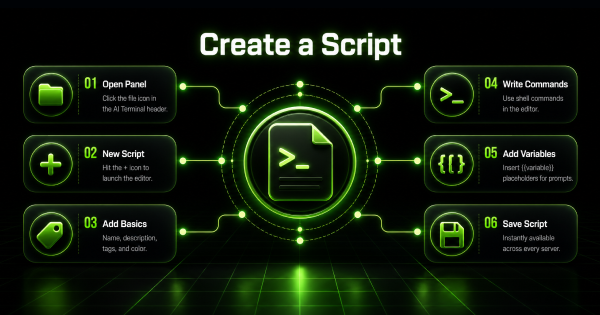
Script Directory
Save the commands you retype every week, with variables filled in at run time. One click on any server.
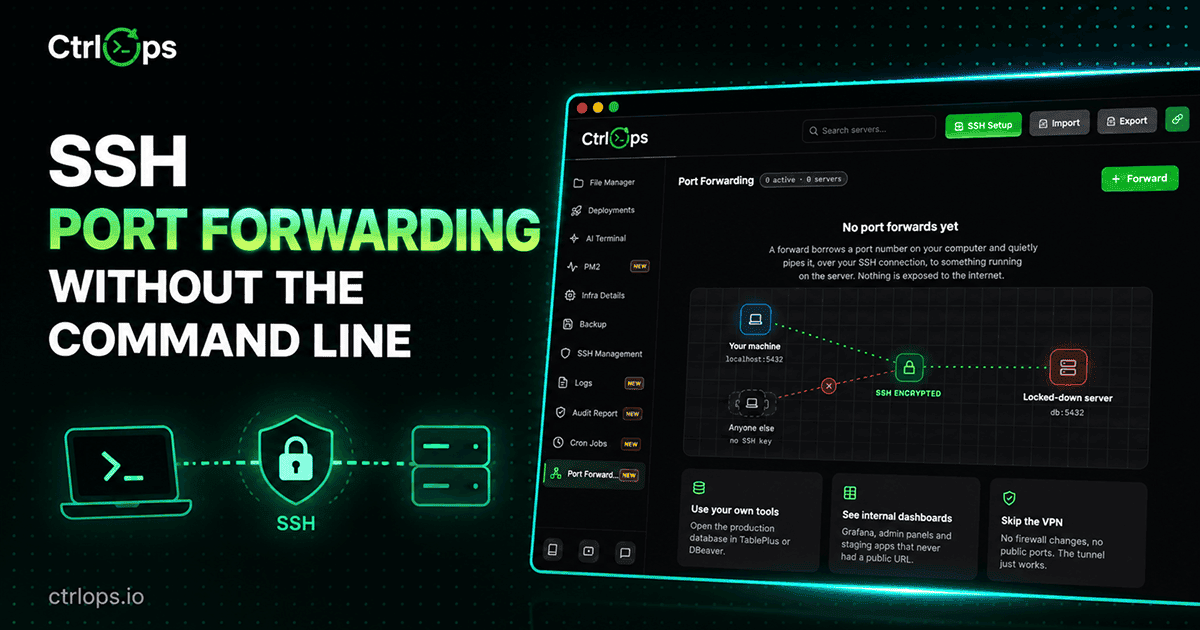
Port Forwarding
Reach a private database or an internal dashboard on your own machine, without opening a port or running a VPN.
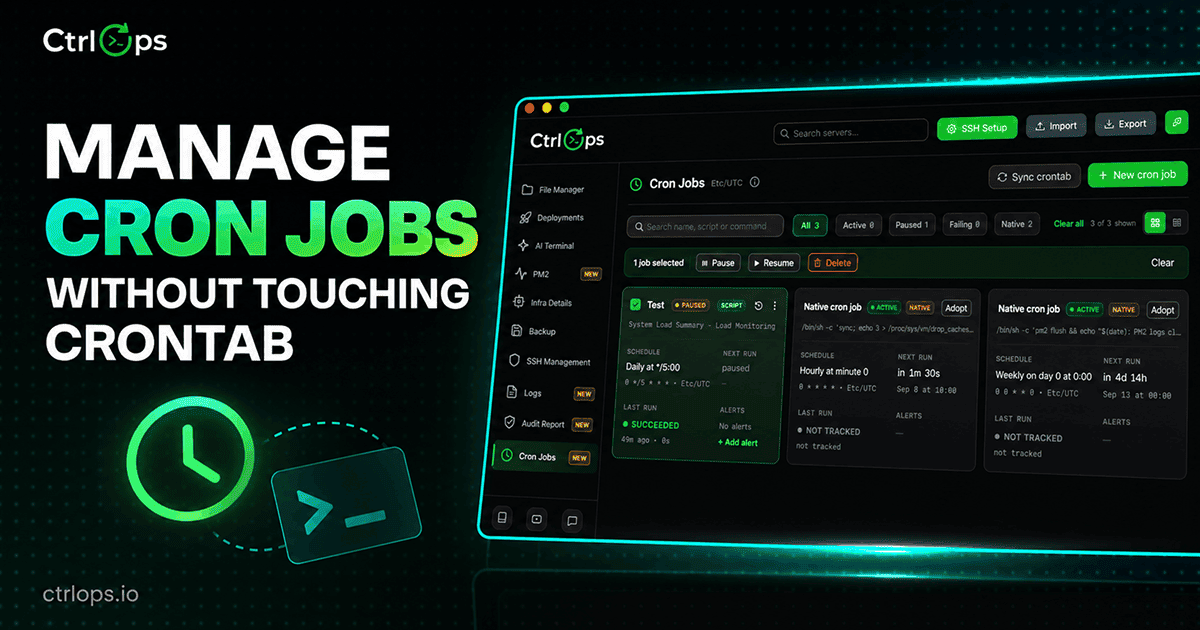
Cron Jobs
Schedule anything on a server without writing cron syntax, adopt the jobs already there, and get told the moment one fails.
Questions developers ask first.
Stop memorizing. Start asking.
Deploy, debug, and manage Linux servers in plain English - and approve every command before it runs. 1-month free trial, no credit card.
✓ Start instantly·✓ No credit card·✓ No sneaky autorenewals