For DevOps & SRE
Fix production issues on your Linux servers.
Logs, processes, files and the terminal for your Linux servers, in one desktop app over SSH. Every fix is explained before it runs and checked after. Your CI and monitoring stay as they are.
14-day free trial, no credit card required.
Any Linux server or VM, from web hosts to self-hosted runners. The app runs on macOS, Windows and Linux.
 4.8 / 5on G2
- 1,000+ engineersin 160+ countries
Which one hit you this week?
GitHub Actionsdeploy #482 succeededAnd the server agrees
Example, Deploy green, site 502: Check the site from outside, not just the process: 200 again, and api stays up.
Sound familiar?
It said success. It wasn’t. Each one has a fix here.
Public issues, questions and incident reports from GitHub, Stack Overflow and Laravel Cloud. What went wrong first, then the fix.
GitHub issue · 2026
“No new jobs are picked up despite runner being online and connected”
Connect to the runner host, find the process that never exited, and restart the runner, with every command explained before you run it. How the AI terminal works
Laravel Cloud · 2026
“…apps continued to run normally; they were simply unreachable”
The Website down alert checks your URL every 2 minutes from a different server, so a site users can’t reach still alerts you while the host looks fine. How alerts work
Stack Overflow · 2023
“GitHub Actions workflow shows that deployment is successful but when I try to check the changes, I find that there is no new change in the output.”
Open the server itself: the file manager shows what is really in the app folder, and Logs shows what the running app is doing. How the file manager works
Stack Overflow · 2016
“PM2 is stubbornly holding on to the environment variable - even after various restart & ssh sessions.”
Edit .env in the file manager, restart the process from the PM2 tab so it picks the change up, and read its live logs to confirm. How the PM2 tab works
GitHub · 2026
“…while a replacement was generated, it was not automatically deployed on receiving an automated alert.”
After a renewal, ask the AI terminal which certificate the server actually serves. It shows the check and runs it when you approve. How the AI terminal works
Built for DevOps
Every release. Every incident. All in one app.
The host work that comes back with every deploy, every alert and every week, on the real screens that do it.
14-day free trial, no credit card required.
Every release
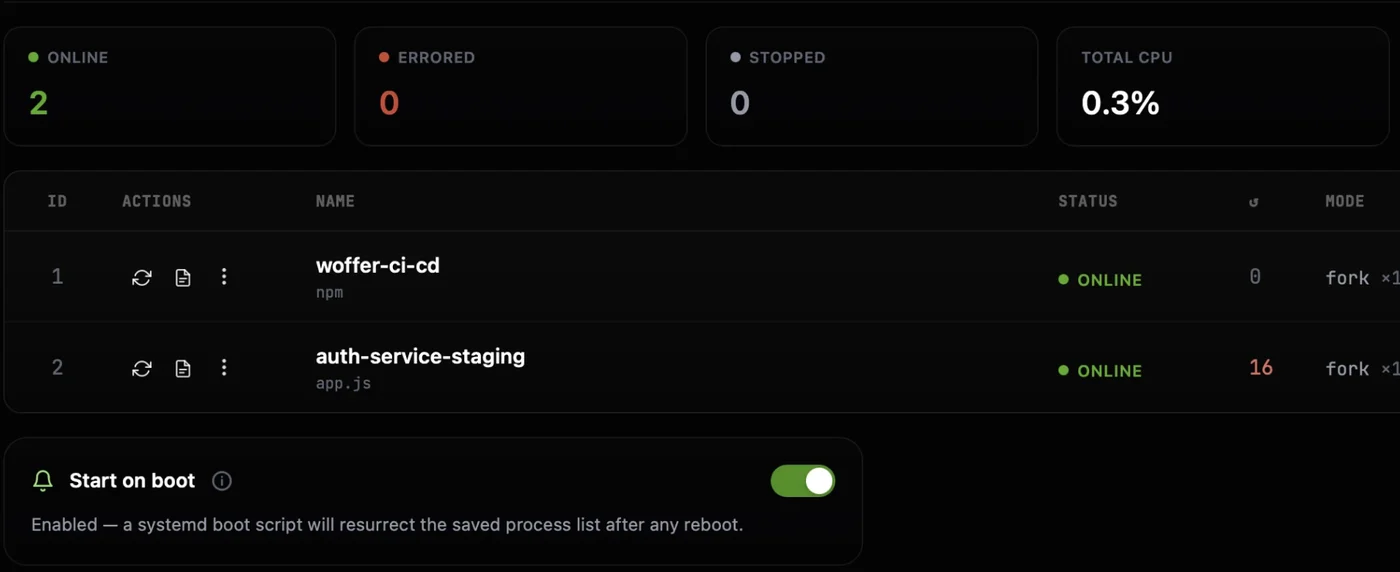
See which app keeps crashing
Every PM2 process with its status, restart count, CPU and memory. Restart or reload one in a click.
Around the clock
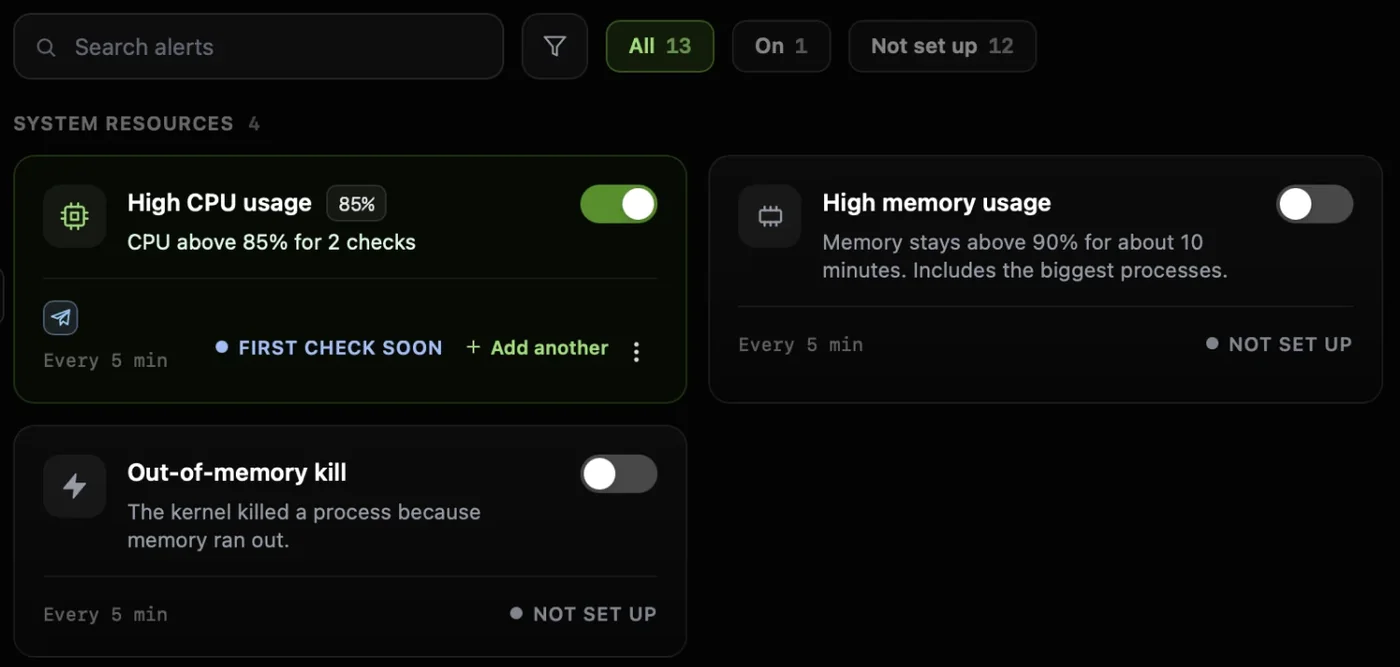
Works with the app closedHear about a full disk before a build fails
13 ready-made checks for disk, services, SSL and your site, sent to Slack or Telegram.
Every config change
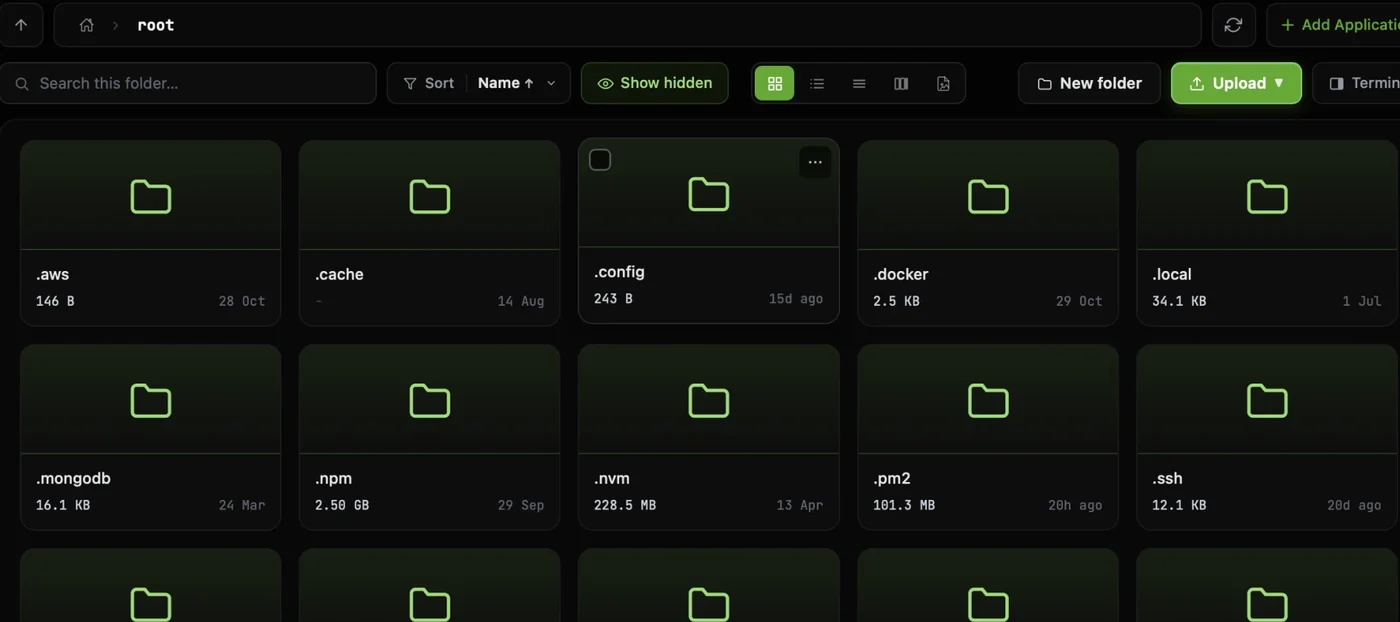
Fix a config or .env without vim
Browse, edit and upload files over SSH, and set permissions with checkboxes.
Every incident
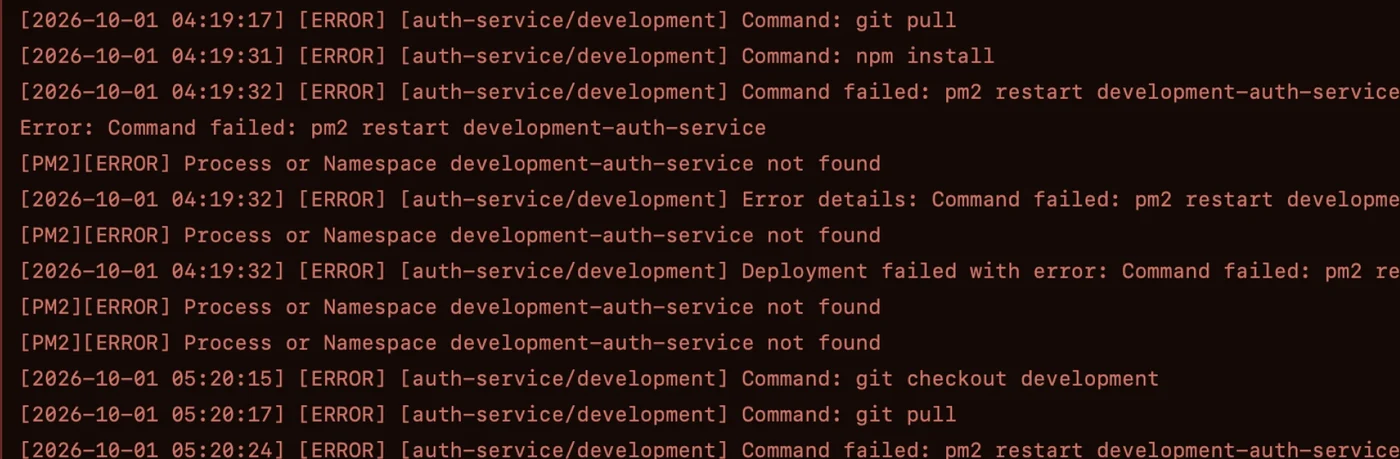
Find the step that failed
Nginx and PM2 logs are found for you. Search them, follow them live, or add any path.
When a job hangs
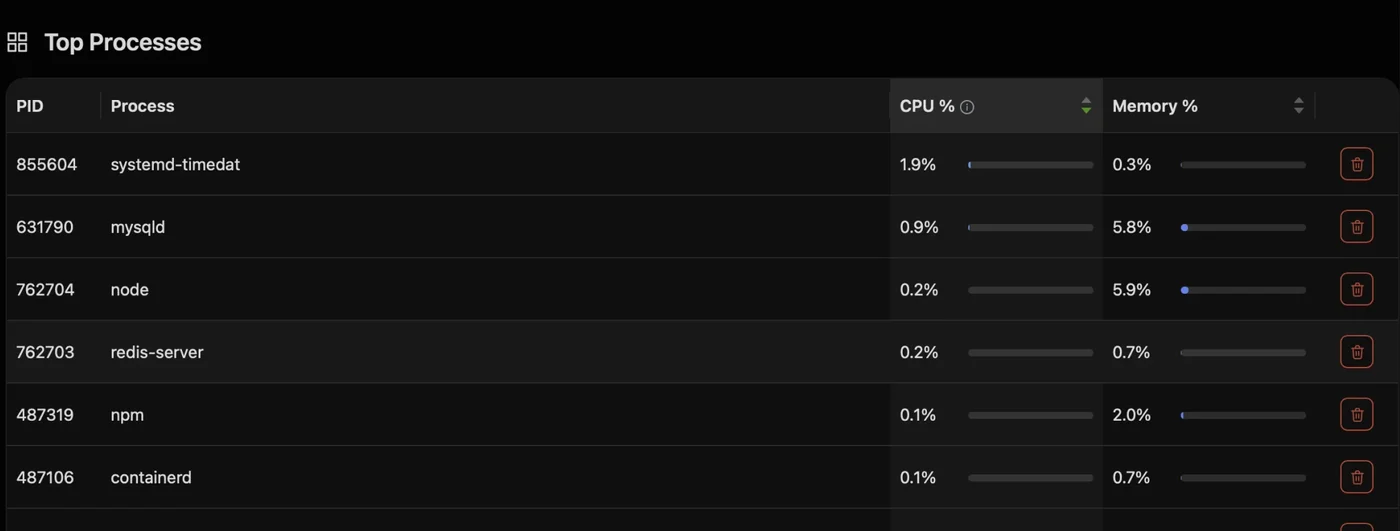
Find and end a stuck process
Live CPU, memory and disk with the top processes. End one from the table, without top or kill.
Every week
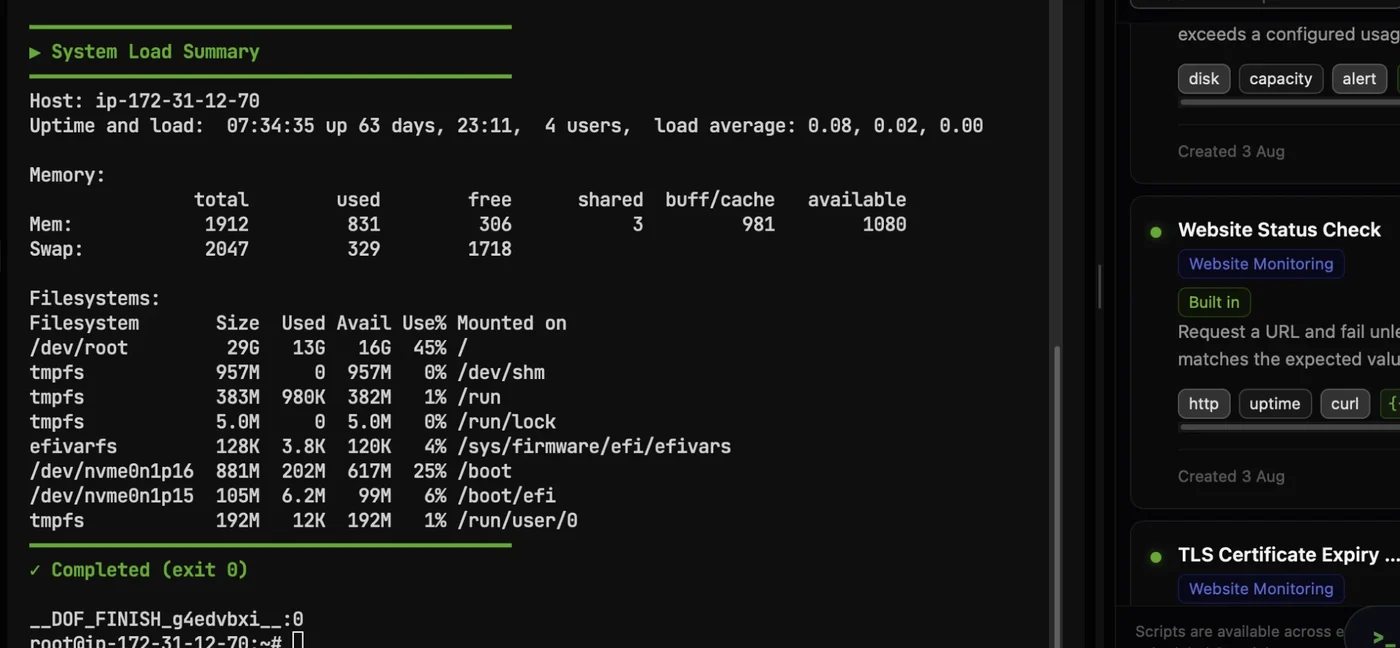
Turn a runbook into one click
19 built-in checks and your own scripts, with variables, run on the server you are on.
- Servers
- Linux servers and VMsUbuntu, Debian, RHEL, Rocky, AlmaLinux, CentOS, Fedora, Amazon Linux
- Connect
- SSHPassword or .pem key, direct or through a bastion
- Your stack
- Stays as it isCI, IaC and monitoring keep their jobs; CtrlOps works on the host
- On your servers
- Nothing to installIt works over SSH. Alerts and backups you switch on run as cron jobs
Safe on production
Production-safe by default. Every command waits for you.
Every session shows which server and login you're on, and every change waits for your Run. Here is one config reload on a production server, taken apart.
The AI only suggests. Nothing reaches your server until you press Run.
Auto-Run stays off unless you switch it on.
- 1Always know which environmentThe server, the login and its Production tag head every session, so staging and prod never look alike.
- 3One server at a timeA command runs on the server you're in. It never fans out across your fleet.
- 5Nothing runs until you press RunRun or cancel each command. Auto-Run stays off unless you switch it on.
I changed the upstream port in nginx, apply it
Test the new config first, then reload nginx so it picks up the change without dropping connections.
$ sudo nginx -t && sudo systemctl reload nginxWhynginx -t checks the config first. The reload only runs if it passes, so a typo can’t take the site down.
5RunEditCancel- 2See what this login can doA badge shows whether the account is Sudo, Standard or Restricted on this server.
- 4Changes are flagged firstAnything that changes the server carries an amber flag and a plain-English why, before you decide.
- 6Your keys stay on this machineSSH keys, passwords and AI keys are stored AES-256 encrypted on your computer, with no CtrlOps relay in between.
- 1Always know which environmentThe server, the login and its Production tag head every session, so staging and prod never look alike.
- 2See what this login can doA badge shows whether the account is Sudo, Standard or Restricted on this server.
- 3One server at a timeA command runs on the server you're in. It never fans out across your fleet.
- 4Changes are flagged firstAnything that changes the server carries an amber flag and a plain-English why, before you decide.
- 5Nothing runs until you press RunRun or cancel each command. Auto-Run stays off unless you switch it on.
- 6Your keys stay on this machineSSH keys, passwords and AI keys are stored AES-256 encrypted on your computer, with no CtrlOps relay in between.
Reviews
DevOps problems, in their own words.
Public posts from people who run apps on Linux servers. Each one names a problem from this page.
Context switching in an incident
The AI-assisted debug loop for Linux servers is something we've wanted at RetainSure for a while. Chasing down intermittent issues across multiple EC2 instances usually means a lot of context switching between logs, metrics, and SSH sessions.


AI on production
"AI suggests, you approve" framing is strong, especially for something as sensitive as servers.

Debugging at 11pm
this is exactly what i wanted last week debugging my railway worker at 11pm honestly 😭

Node apps on PM2
The PM2 manager looks super useful for NodeJs team

Repeating the same steps
CtrlOps Scripts feature is a huge DevOps productivity boost. Save, reuse & run scripts directly from the panel. 🚀

Pricing
More servers, same price. You pay per person.
Servers are unlimited on every paid plan, so staging, runners and new environments cost nothing extra. The more servers your team runs, the less each one costs.
At 30 servers
$1.30per server, per month
1 serverDrag to size your fleet300 servers
| Servers | Per server, per month |
|---|---|
| 1 | $39 |
| 10 | $3.90 |
| 50 | $0.78 |
| 100 | $0.39 |
| 300 | $0.13 |
No, they keep their jobs. CtrlOps is where the work on the Linux host happens: logs, processes, files and the terminal over SSH. When a fix belongs in code, it still goes back through your repo and pipeline.
It works on any Linux host you can reach over SSH: VMs, bare metal, self-hosted runners and nodes. Cluster objects such as pods, deployments and Helm releases stay with kubectl and your GitOps tooling.
No agent, no panel and no new port: CtrlOps connects over the SSH your servers already run. A few features add standard tools when you use them: alerts add cron jobs, backups add rclone, and deploys install PM2, Nginx and Certbot if they are missing.
A script runs on the server whose terminal you have open, one server at a time; CtrlOps never runs a command across your fleet. Save it once with variables, then run it on each server you need. See how Scripts work.
By default, no. Every command it suggests comes with a plain-English why and waits for you to run or cancel it. Auto-Run is a switch you can turn on later; with it on, only read-only commands run by themselves, and sudo and everything else still wait for you.
The one you choose: sign in with ChatGPT, connect OpenRouter, add your own OpenAI, Anthropic or Google key, or point it at any OpenAI-compatible endpoint, including a model you run yourself. Your questions and the output of commands you run go to that provider. CtrlOps charges no AI fee.
A command-level audit trail is coming soon. Today you can export who can log in to which server from Access, and download a security audit of a server as a PDF.
Yes. Add the jump host in the Proxy Command field under Advanced Settings, for example ssh -W %h:%p user@bastion, and CtrlOps routes the connection through it. See the first connection guide.
On your computer. SSH keys, server passwords and AI keys are stored AES-256 encrypted and never sync to a CtrlOps cloud. Your machine talks to your servers directly.
Both. Personal comes with a 14-day free trial with every feature, no card needed. When it ends you move to Free, which covers 2 servers on 2 devices with no end date. Team and Enterprise have no trial: try Personal first.
Stop juggling tools. Start managing fleets.
One app. All your servers. No context switching. Free to start, free to leave.
Start instantly · No credit card · Cancel anytime