For SysAdmins & IT Ops
Fix the right server. Prove it's fixed.
Alerts, logs, files, cron jobs and server access for the Linux servers you look after, in one desktop app over plain SSH. Always see which server you're on, decide what runs, and check the result before you close the ticket.
14-day free trial, no credit card required.
For Linux servers: Ubuntu, Debian, RHEL, CentOS, Fedora and Amazon Linux. The app runs on macOS, Windows and Linux.
 4.8 / 5on G2
- 1,000+ engineersin 160+ countries
Which one hit your desk this week?
Example, Disk full, df says free: Check the result, not the command: inodes are back and new files write.
Sound familiar?
Five incidents admins posted. Each one has a fix here.
Real posts from people who run servers, on Product Hunt, LinkedIn, Server Fault and Stack Overflow. The incident first, then the fix.
Product Hunt
“Wrong tab, wrong server, restarted nginx thinking I was on staging. Took down prod for an hour.”
Every session names its server and shows its Production tag before you type a thing. See the guardrails
Stack Overflow · 2025
“In the log files, I don’t see any log messages from it, not even an error.”
Cron Jobs shows every job with its last run and full output, and Run now tests it on the spot. How Cron Jobs works
Product Hunt
“Chasing down intermittent issues across multiple EC2 instances usually means a lot of context switching between logs, metrics, and SSH sessions.”
Logs, live CPU, memory and disk, and the terminal sit in one window, on the server you picked. See your week in CtrlOps
Server Fault · 2023
“…certbot successfully requests the certificate and write the new certificate into the store. But with the reload command the nginx is not using the new certificate.”
The SSL alert checks the certificate your site actually serves, by hostname and port, so a renewal nginx never picked up still warns you. How the SSL alert works
“…a spreadsheet of IPs, a bunch of SSH tabs, and one person who "knows the servers" and becomes a single point of failure the moment they're unavailable.”
Every server lives in one app, and Access gives each teammate their own login and role on the servers they need. How Access works
Built for sysadmins
Your servers. Your daily operations. All in one app.
The work that comes back every day, every week and whenever someone joins or leaves, on the real screens that do it.
14-day free trial, no credit card required.
Every day
Works with the app closedCatch server issues before users notice
13 ready-made checks for CPU, disk, services, SSL and SSH brute force.
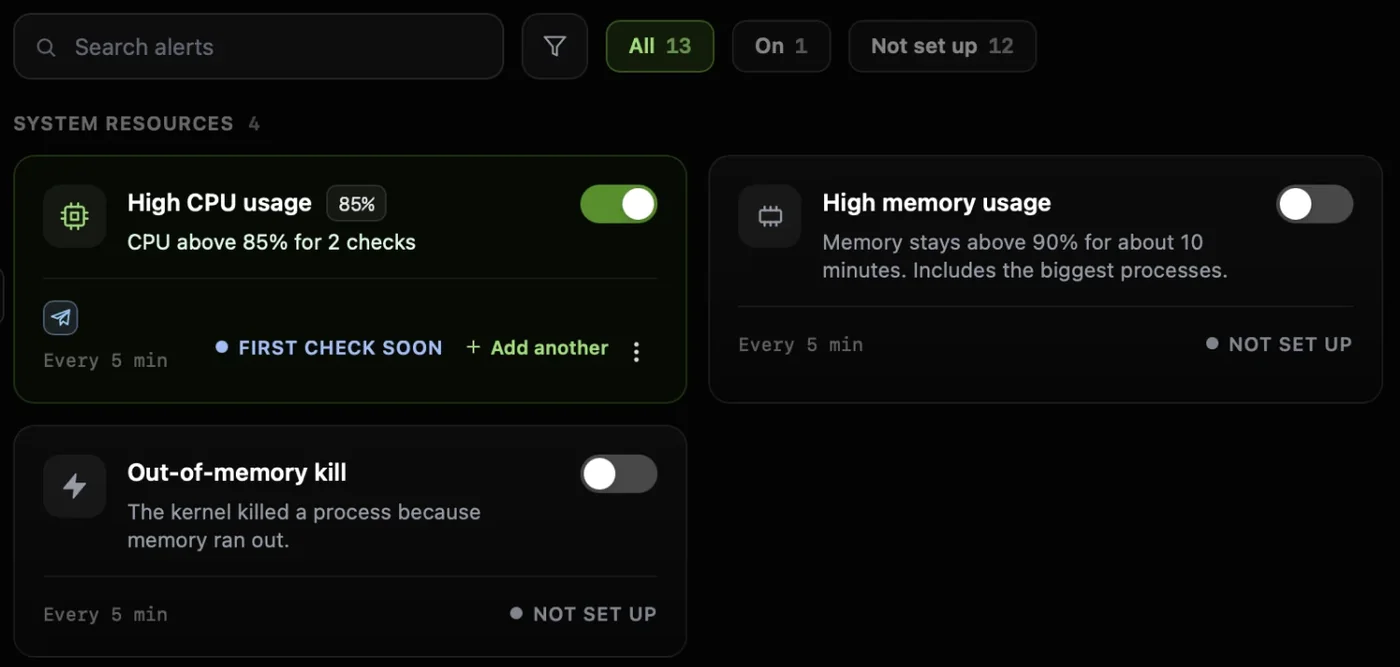
Every day
Find what's slowing down your server
Live CPU, memory and disk, and the processes behind them, without top or free.
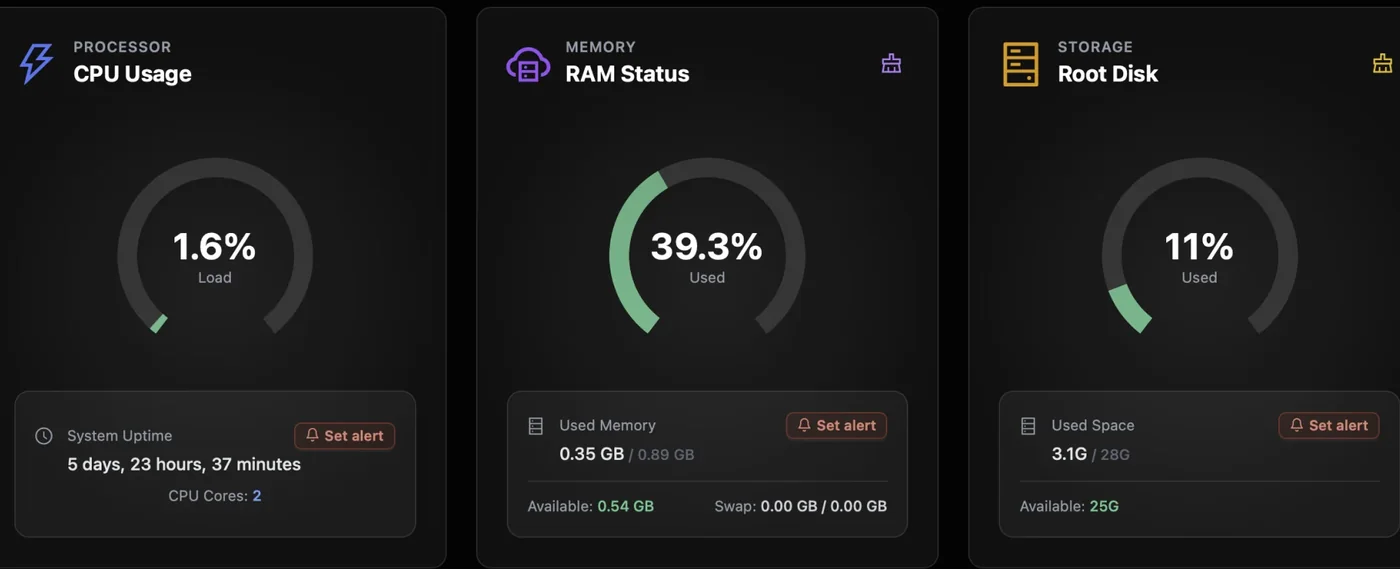
Every day
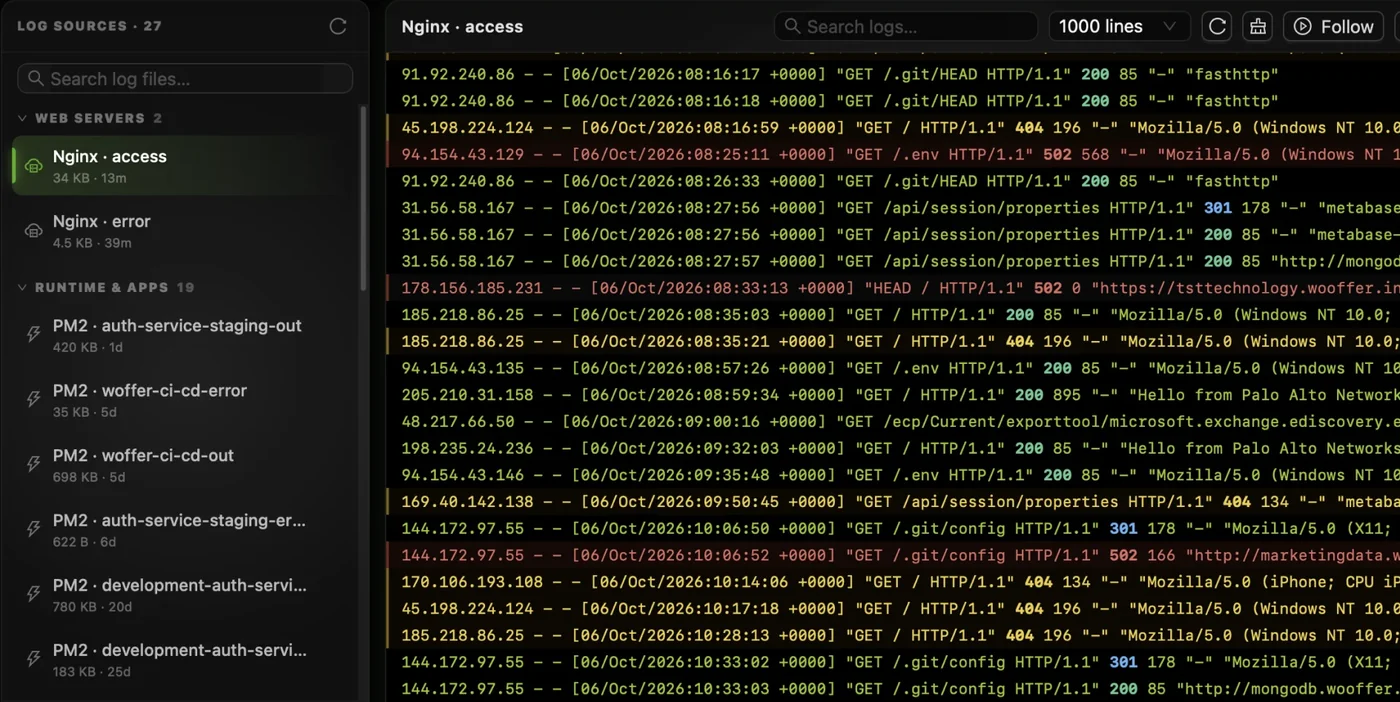
Read any log in a click
Every log on the server found and grouped for you. Search it, or follow it live.
When people change
Know who can log in where
Scan every server, give a new teammate a login on each one, and take a key off all of them in one action.
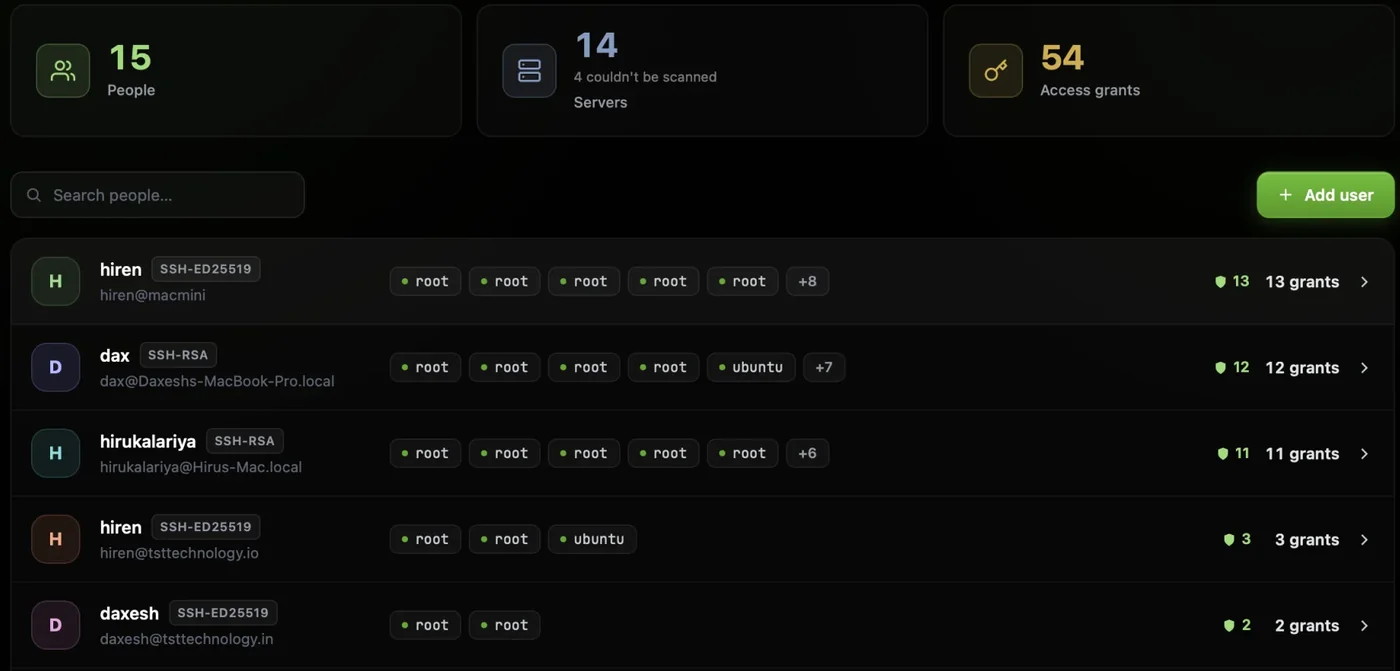
Before an audit
Find security gaps before they become problems
Run security audits over SSH and get a hardening score, the findings and a PDF to send on.
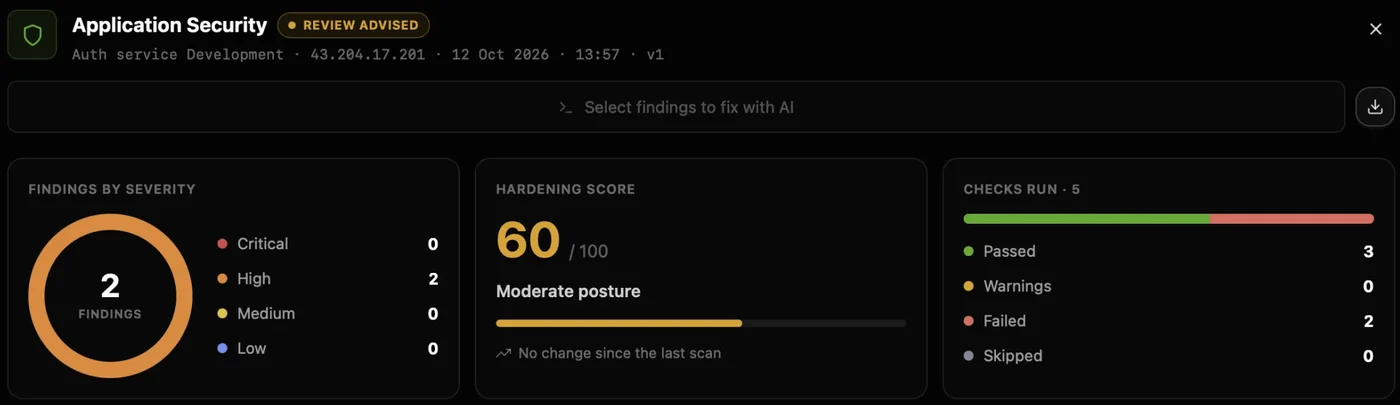
Every week
Know your scheduled jobs ran successfully
Each cron job with its schedule, next run and last result, and an alert the moment one fails.
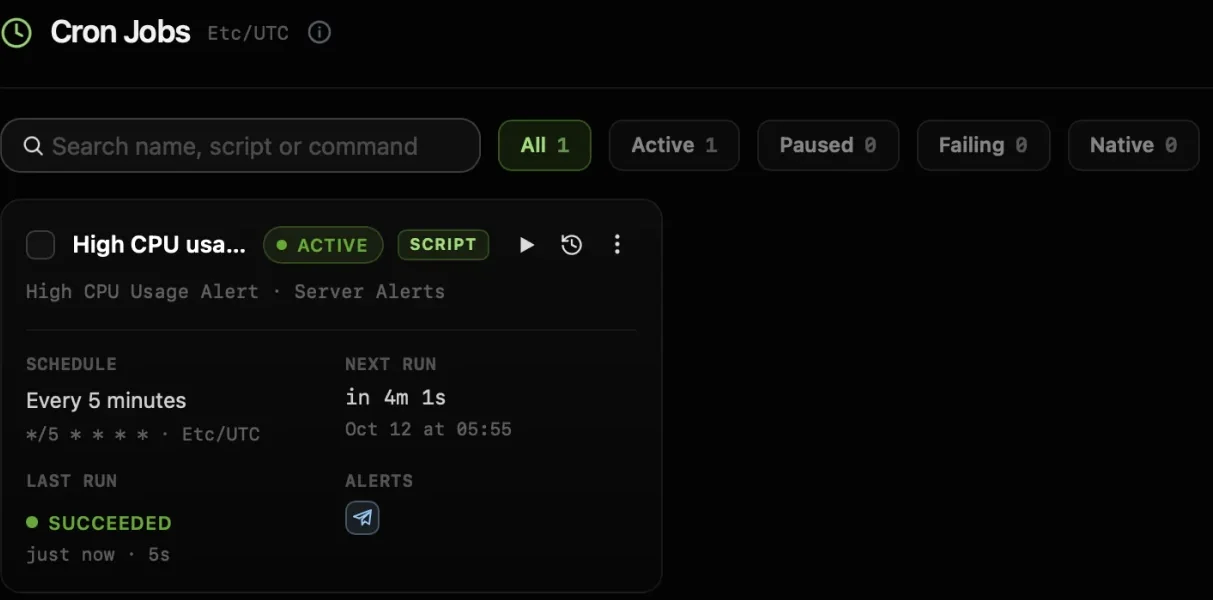
- Servers
- Mainstream LinuxUbuntu, Debian, RHEL, Rocky, AlmaLinux, CentOS, Fedora, Amazon Linux
- Connect
- SSHPassword or .pem key, direct or through a bastion
- The app
- macOS, Windows, LinuxApple Silicon and Intel; Windows from the Microsoft Store
- On your servers
- Nothing to installIt works over SSH. Alerts and backups you switch on run as cron jobs
Safe on production
Made for production. Guardrails on every command.
Every session shows where you are and what you're allowed to do, and every change waits for you. Here is one command on a production server, taken apart.
The AI only suggests. Nothing reaches your server until you press Run.
Auto-Run stays off unless you switch it on.
- 1Always know where you areThe server, the login and its Production tag sit at the top of every session, before you type a thing.
- 3One server at a timeA command runs on the server you're in. It never fans out across your fleet.
- 5Nothing runs until you press RunRun or cancel each command. Auto-Run stays off unless you switch it on.
nginx is returning 502 since the deploy
The app service on web-02 stopped answering nginx. A restart should bring it back.
$ sudo systemctl restart app.serviceWhyRestarts only the app service. nginx, the database and everything else keep running.
5RunEditCancel- 2See what this login can doA badge shows whether the account is Sudo, Standard or Restricted on this server.
- 4Changes are flagged firstA command that changes the server carries an amber flag and a plain-English why.
- 6Your keys stay on this machineSSH keys, passwords and AI keys are stored AES-256 encrypted on your computer, with no CtrlOps relay in between.
- 1Always know where you areThe server, the login and its Production tag sit at the top of every session, before you type a thing.
- 2See what this login can doA badge shows whether the account is Sudo, Standard or Restricted on this server.
- 3One server at a timeA command runs on the server you're in. It never fans out across your fleet.
- 4Changes are flagged firstA command that changes the server carries an amber flag and a plain-English why.
- 5Nothing runs until you press RunRun or cancel each command. Auto-Run stays off unless you switch it on.
- 6Your keys stay on this machineSSH keys, passwords and AI keys are stored AES-256 encrypted on your computer, with no CtrlOps relay in between.
Reviews
Your problems, in their own words.
Public posts from people who look after servers. Each one names a problem from this page.
Many client servers
ok so the file manager sounds boring, I know. But I was doing everything through a separate SFTP client before this. separate login, separate window, separate headache every time. now i just open it inside CtrlOps and edit configs directly. for someone managing multiple client servers, this is honestly the feature i use the most. more than the AI stuff even.


AI on production
The approval boundary feels like the real product here. Once AI is suggesting server actions, the useful question is not just whether a command was generated, but whether the operator has enough context to approve it safely.

The IP spreadsheet
The spreadsheet of IPs is a very specific kind of pain haha. One-click deploys plus an AI terminal that still asks before running commands sounds like the right amount of help

Repetitive server work
The one-click server actions caught my attention. Being able to manage users, PM2 processes, and logs without writing commands could save a lot of repetitive work.

Someone leaves the team
HR person commenting on a server tool, I know. But whenever someone leaves the team, we need their server access gone immediately. Before this it was a whole back and forth with tech. Now I check SSH management myself and flag it in 2 minutes. Offboarding got so much easier, honestly.
Pricing
Your fleet grows. Your bill doesn't.
You pay per person, and servers are unlimited on every paid plan. The more servers you look after, the less each one costs.
At 40 servers
$0.98per server, per month
1 serverDrag to size your fleet300 servers
| Servers | Per server, per month |
|---|---|
| 1 | $39 |
| 10 | $3.90 |
| 50 | $0.78 |
| 100 | $0.39 |
| 300 | $0.13 |
Mainstream Linux: Ubuntu, Debian, RHEL, Rocky Linux, AlmaLinux, CentOS, Fedora and Amazon Linux, on-prem or in any cloud, as long as you can reach them over SSH. The app itself runs on macOS, Windows and Linux.
No agent. CtrlOps connects over the SSH your servers already run. Alerts and backups you switch on are set up as cron jobs on that server, so they keep working with the app closed.
You can connect as any user, and every session shows its role. Some jobs need more: alerts and adding users need root or sudo, and an audit run without root marks the checks it cannot read as SKIP and shows its coverage.
Yes. Add the jump host in the Proxy Command field under Advanced Settings, for example ssh -W %h:%p user@bastion, and CtrlOps routes the connection through it. See the first connection guide.
On your computer. SSH keys, server passwords and AI keys are stored AES-256 encrypted and never sync to a CtrlOps cloud. Your machine talks to your servers directly.
By default, no. Every command it suggests comes with a plain-English why and waits for you to run or cancel it. Auto-Run is a switch you can turn on later; with it on, only read-only commands run by themselves, and sudo and everything else still wait for you.
The one you choose: sign in with ChatGPT, connect OpenRouter, add your own OpenAI, Anthropic or Google key, or point it at any OpenAI-compatible endpoint, including a model you run yourself. Your questions and the output of commands you run go to that provider. CtrlOps charges no AI fee.
Open Access, scan your servers, open the person and choose Remove from all servers. Type their name to confirm, then re-scan to check. New logins are blocked at once; an SSH session they already have open lasts until it ends.
From Termius, yes: the built-in importer reads your hosts, ports, usernames and keys on your machine. See how to move from Termius. For any other client, paste an SSH string or fill in the host, user and key.
Both. Personal comes with a 14-day free trial with every feature, no card needed. When it ends you move to Free, which covers 2 servers on 2 devices with no end date. Team and Enterprise have no trial: try Personal first.
Stop juggling tools. Start managing fleets.
One app. All your servers. No context switching. Free to start, free to leave.
Start instantly · No credit card · Cancel anytime